


Smarty Men Jacket Photo Editor
3.571.00 Reviews
App Specs
- Version
- 2.6.6
- Updated On
- License
- Free
- Downloads
- 10,000,000+
- Developer
- One Logix Studio
- Categories
- Beauty
- Platform
- Android
Screenshots
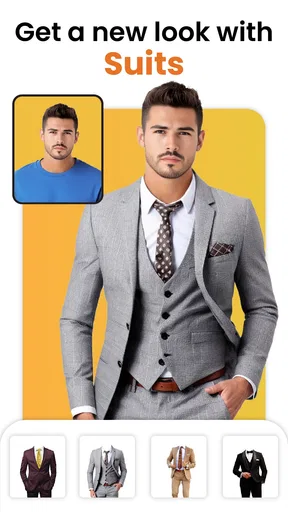
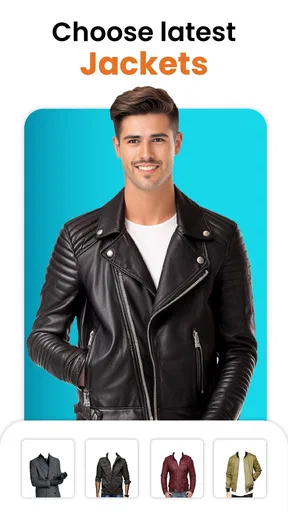
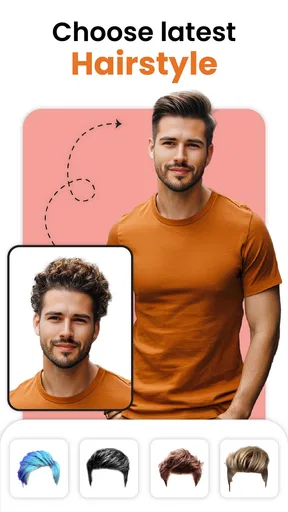
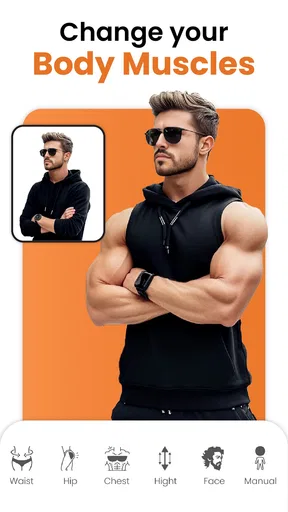
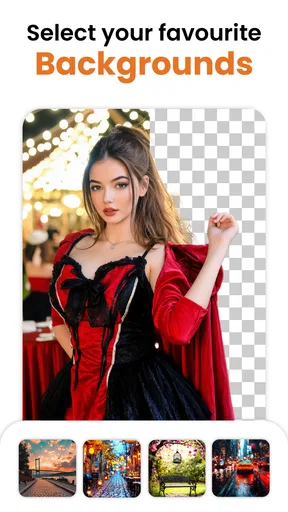
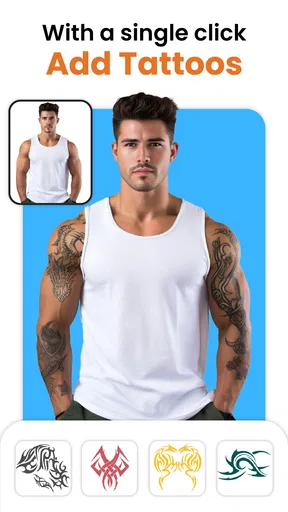
 Analysis by AppCompare
I’d treat Smarty Men Jacket Photo Editor as a playful styling tool, not a substitute for trying on clothes or a full photo-editing suite. Its appeal is simple: you can experiment with men’s jackets, hair and beard looks, and background removal in one place. That combination makes it useful when I want to test a visual idea quickly, but the result depends heavily on the photo I start with and how carefully I adjust the edits.
What I’d check before opening the editor
For this kind of app, my first question is not how many choices it offers; it’s whether the finished image will look believable enough for my purpose. A casual joke for a group chat can be fun even when an overlay is a little imperfect. A profile picture meant to represent me accurately needs a more natural fit, clean edges, and lighting that matches throughout the image. I’d decide which of those outcomes I want before spending time polishing a look.
The app is a free beauty editor from One Logix Studio, with optional in-app purchases listed from $1.99 to $69.99 per item. It has an Everyone content rating, and its current version is 2.6.5. The minimum operating-system requirement is Android 7.0, so it is aimed at a broad range of Android devices. I’d still check the purchase screens carefully before confirming anything, especially if I’m only trying the app for a one-off edit.
Its average rating is 3.5 from around 13,000 ratings, and it has more than 10 million installs. I read those figures as a sign that plenty of people have tried it, while the middling average is a reason to keep expectations practical rather than assume every cutout and clothing overlay will suit every portrait. It was released on January 22, 2021, so it has been around long enough to establish its basic purpose: quick, entertaining appearance edits rather than a new kind of fashion-shopping experience.
Trying on a look without buying anything
Imagine having a wardrobe brimming with stylish jackets without ever stepping foot in a store. Sounds like a dream, right? Smarty Men Jacket Photo Editor makes this dream a reality. The app offers a wide variety of jacket styles, from classic leather jackets to trendy denim, and everything in between. You simply upload your photo, and voilà—you're wearing the jacket of your choice! The intuitive interface makes it easy to navigate, even if you’re not a tech wizard.
When this focused editor is at its best
The app’s strongest use case is a low-stakes style preview. I can see it working well when I’m curious whether a sharper jacket silhouette suits a portrait, or when friends are trading amusing edited photos and want a quick visual gag. Since the app also covers hair and beard styling, I can test a coordinated change—say, a different haircut with a jacket—without jumping between several separate tools. That is more convenient than using a basic sticker editor for each part of the look.
For a useful comparison, a general-purpose photo editor is usually the better choice when I need precise control over layers, masks, color matching, or retouching. A dedicated virtual try-on or shopping tool is a better fit if I’m trying to judge a real garment before spending money. This editor sits between those categories: it’s built for quick appearance play, not reliable product visualization or detailed compositing. I wouldn’t use a generated outfit as evidence of how a specific jacket will fit or look in real life.
Worth Reading Before You Choose

Flipboard Shows What News Apps Must Do Beyond the Feed

Switching to Android Auto Means Rethinking Your Driving Routine

Google Calendar Makes a Crowded Week Easier to Manage

Ludo King Makes the Most of the Minutes Between Plans

Baby Panda World Brings Quick Play to Modern Phones, but Its Game Library Feels Busy

ESPN’s Live Game View Makes Following Close Games Easier
The source portrait makes a bigger difference than a first-time user might expect. I’d start with a clear, front-facing image, with the shoulders visible and a fairly simple background. A cropped headshot gives the clothing overlay less room to sit naturally, while a busy scene can make background removal harder to judge. This is a practical trade-off: taking a moment to choose a better source image can improve the result more than scrolling through extra styles.
A simple workflow for more convincing edits
The app is designed with simplicity in mind. All you need to do is snap a selfie or upload a photo from your gallery. Then, the magic begins. You can scroll through a plethora of jacket styles, effortlessly overlaying them onto your photo. It’s almost like having a stylist in your pocket, ready to help you find your next killer look. I lost track of time trying on different styles, each one making me look sharper than the last.
And it’s not just about trying on jackets. The app allows you to adjust the fit, so it looks natural and convincing. The built-in editing tools are quite handy, letting you tweak brightness, contrast, and even add a pop of color to your images.
For the most useful comparison, I’d keep the original photo beside the edited version while I work. I’d check the collar and shoulder line first, then look at whether the overlay’s brightness sits comfortably with the face and surroundings. If the clothing looks pasted on, a small fit adjustment or a different source photo may help; changing brightness and contrast can make the overall image feel more consistent, but it won’t fix a mismatched pose. That distinction saves time: I wouldn’t keep applying color tweaks to an overlay that simply doesn’t align with the body.
A realistic everyday scenario would be getting ready for a social profile refresh and wanting a quick sense of whether a jacket-style portrait feels more like me. I’d try a couple of options, compare them with my unedited photo, and ask a friend for an opinion before choosing one to share. I’d treat the result as a style experiment, not as a promise that the same look will translate to a real outfit. If the image is for a professional profile, I’d lean toward a straightforward, unaltered portrait instead.
Sharing, collages, and the point where I’d stop
Once you’ve found the perfect look, sharing it with friends is just a tap away. Whether you want to boast about your new virtual jacket on Instagram or send it to a friend for a second opinion, Smarty Men Jacket Photo Editor makes sharing seamless. It’s a blast seeing how your friends react to your stylish transformations—they might even ask you where you got your jacket!
In addition, the app provides a special feature where you can create a collage of your favorite looks. This is perfect for those who love to showcase their fashion evolution or keep a visual diary of their style experiments.
A collage is most useful when I’m comparing a small set of distinct ideas, such as different jacket shapes or combinations of hair and facial hair. I’d keep the original image available and avoid filling the collage with near-identical edits; too many tiny variations make it harder to see what actually changed. A compact comparison can also make it easier to ask a friend a clear question—whether one look feels more relaxed or more formal—rather than asking them to judge a pile of versions at once.
Before sharing, I’d inspect the edges around the hair, neck, and shoulders, where cutouts and overlays tend to be most noticeable. Background removal can help separate a subject from a distracting setting, but it is not a reason to assume every edge will be flawless. If a boundary looks rough, I’d choose a simpler background or keep the original scene rather than force the edit. This is one of the app’s central trade-offs: quick transformations are convenient, but a convincing finish still needs a little visual judgment.
People often wonder whether they need to pay to get started. The app is free to download, while optional purchases are available; I’d try the basic workflow first and only consider spending if I find a specific paid option worth it. The listed purchase range is broad, so I would check the price shown for the exact item I’m considering rather than assume every tool or style has the same cost. That also makes it a sensible app to approach as a casual experiment instead of committing to a purchase before knowing whether its editing style suits me.
Another practical question is who should skip it. If I need precise, realistic clothing mock-ups, professional retouching, or dependable help choosing a garment to buy, I’d use a more specialized alternative. If I dislike playful overlays or want every edit to preserve a strictly natural appearance, this app may feel too limited. It is better suited to people who enjoy trying out looks and sharing informal results than to anyone who needs a highly controlled final image.
Who I’d recommend it to
Overall, Smarty Men Jacket Photo Editor is a delightful app for anyone looking to spice up their photos with a touch of style. It’s easy to use, offers a wide range of options, and is a lot of fun. While it may not replace your actual shopping trips, it’s a creative and entertaining way to envision your next fashion statement from the comfort of your home. If you’re a fan of photo editing and fashion, this app is definitely worth a download. Who knows, you might discover a new favorite style!
My recommendation is strongest for someone who wants a quick, approachable way to play with men’s fashion edits, compare a few looks, or make a lighthearted image for friends. I’d start with a well-lit portrait, make only a few deliberate changes, and judge the outcome at normal viewing size before sharing it. If that simple process sounds enjoyable, the app’s focused mix of jacket, hair, beard, and background editing is a good reason to try it. If accuracy and fine-grained control matter more than speed, I’d choose a dedicated editor or a real try-on option instead.
Pros
- Easy-to-use interface for quick edits.
- Wide variety of jacket styles available.
- High-quality output images.
- Supports photo sharing directly from app.
- Regular updates with new features.
Cons
- Contains ads that can be intrusive.
- Limited free options; many styles are paid.
- Occasional app crashes reported.
- Editing tools lack precision for fine adjustments.
- Requires an internet connection for full features.
FAQs for Smarty Men Jacket Photo Editor
What is Smarty Men Jacket Photo Editor?
Smarty Men Jacket Photo Editor is a creative app designed for fashion enthusiasts who love experimenting with different jacket styles. It allows users to virtually try on various jackets using their photos, offering a realistic preview of how each style looks. The app is perfect for exploring new fashion trends without any commitment.
How user-friendly is the app for beginners?
Smarty Men Jacket Photo Editor is designed with an intuitive interface, making it accessible even for beginners. The app provides step-by-step guidance on how to upload photos and apply jacket styles, ensuring a smooth user experience. Its simplicity allows users to quickly navigate through features and create stylish looks with ease.
Does the app offer a wide variety of jacket styles?
Yes, the app boasts a diverse collection of jacket styles to suit different tastes and occasions. From casual to formal, users can explore a range of options, including leather, denim, and blazer styles. Regular updates ensure that new fashion trends are added, keeping the wardrobe fresh and exciting.
Are there any costs associated with using Smarty Men Jacket Photo Editor?
Smarty Men Jacket Photo Editor is free to download and use, offering a selection of basic features at no cost. However, for those seeking additional styles or premium features, in-app purchases are available. This model allows users to enjoy the core functionalities while having the option to enhance their experience.
Is the app available for both Android and iOS devices?
Yes, Smarty Men Jacket Photo Editor is available for download on both Android and iOS platforms. This ensures a wide range of users can access and enjoy the app regardless of their device preference. Installation is straightforward, and links to the respective app stores can be found on our website.


